name: inverse layout: true class: center, middle, inverse <div class="my-header"><span> <a href="/training-material/topics/statistics" title="Return to topic page" ><i class="fa fa-level-up" aria-hidden="true"></i></a> <a href="https://github.com/galaxyproject/training-material/edit/main/topics/statistics/tutorials/loris_model/slides.html"><i class="fa fa-pencil" aria-hidden="true"></i></a> </span></div> <div class="my-footer"><span> <img src="/training-material/assets/images/GTN-60px.png" alt="Galaxy Training Network" style="height: 40px;"/> </span></div> --- <img src="/training-material/assets/images/GTNLogo1000.png" alt="Galaxy Training Network" class="cover-logo"/> <br/> <br/> # Galaxy Tabular Learner: Building a Model using Chowell clinical data <br/> <br/> <div markdown="0"> <div class="contributors-line"> <ul class="text-list"> <li> <a href="/training-material/hall-of-fame/paulocilasjr/" class="contributor-badge contributor-paulocilasjr"><img src="/training-material/assets/images/orcid.png" alt="orcid logo" width="36" height="36"/><img src="https://avatars.githubusercontent.com/paulocilasjr?s=36" alt="Paulo Cilas Morais Lyra Junior avatar" width="36" class="avatar" /> Paulo Cilas Morais Lyra Junior</a> <li> <a href="/training-material/hall-of-fame/qchiujunhao/" class="contributor-badge contributor-qchiujunhao"><img src="/training-material/assets/images/orcid.png" alt="orcid logo" width="36" height="36"/><img src="https://avatars.githubusercontent.com/qchiujunhao?s=36" alt="Junhao Qiu avatar" width="36" class="avatar" /> Junhao Qiu</a> <li> <a href="/training-material/hall-of-fame/jgoecks/" class="contributor-badge contributor-jgoecks"><img src="/training-material/assets/images/orcid.png" alt="orcid logo" width="36" height="36"/><img src="https://avatars.githubusercontent.com/jgoecks?s=36" alt="Jeremy Goecks avatar" width="36" class="avatar" /> Jeremy Goecks</a></li> </ul> </div> </div> <!-- modified date --> <div class="footnote" style="bottom: 8em;"> <i class="far fa-calendar" aria-hidden="true"></i><span class="visually-hidden">last_modification</span> Updated: <i class="fas fa-fingerprint" aria-hidden="true"></i><span class="visually-hidden">purl</span><abbr title="Persistent URL">PURL</abbr>: <a href="https://gxy.io/GTN:S00139">gxy.io/GTN:S00139</a> </div> <!-- other slide formats (video and plain-text) --> <div class="footnote" style="bottom: 5em;"> <i class="fas fa-file-alt" aria-hidden="true"></i><span class="visually-hidden">text-document</span><a href="slides-plain.html"> Plain-text slides</a> | </div> <!-- usage tips --> <div class="footnote" style="bottom: 2em;"> <strong>Tip: </strong>press <kbd>P</kbd> to view the presenter notes | <i class="fa fa-arrows" aria-hidden="true"></i><span class="visually-hidden">arrow-keys</span> Use arrow keys to move between slides </div> ??? Presenter notes contain extra information which might be useful if you intend to use these slides for teaching. Press `P` again to switch presenter notes off Press `C` to create a new window where the same presentation will be displayed. This window is linked to the main window. Changing slides on one will cause the slide to change on the other. Useful when presenting. --- ### <i class="far fa-question-circle" aria-hidden="true"></i><span class="visually-hidden">question</span> Questions - How can Tabular Learner in Galaxy be used to reconstruct a LORIS-style (LLR6) logistic regression model using the same dataset and predictor set? - How should the decision threshold be configured (default vs selected cutoff) to align predictions with the intended clinical operating point? - Which components of the Tabular Learner report best support a transparent comparison to the published LORIS baseline? --- ### <i class="fas fa-bullseye" aria-hidden="true"></i><span class="visually-hidden">objectives</span> Objectives - Build an immunotherapy-response classifier in Galaxy using Tabular Learner. - Train and compare candidate models, then re-evaluate with a selected probability threshold. - Benchmark discrimination, calibration, and threshold-dependent metrics against the published LORIS LLR6 model. --- # What you will do - Upload preprocessed **Chowell_train** and **Chowell_test** tables (Zenodo). - Train a classification model with **Tabular Learner** in Galaxy. - Re-evaluate the selected model at a **chosen probability threshold**. - Use the HTML report to compare results to **LORIS LLR6 (Chang et al., 2024)**. ??? This tutorial treats the published LORIS LLR6 model as a benchmark baseline. The main goal is to understand what changes (and what does not) when the model is rebuilt under a standardized Galaxy workflow. --- # Tool availability - Tabular Learner is available on: - **Cancer-Galaxy** (Galaxy-ML tools → Tabular Learner) - **Galaxy US** (Statistics and Visualization → Machine Learning → Tabular Learner) --- # Use case: LORIS LLR6 (Chang et al., 2024) - **Task**: Predict patient benefit from immune checkpoint blockade (ICB) therapy. - **Model**: Logistic regression (LLR6) trained on 6 predictors. - **Data**: LORIS PanCancer; this tutorial uses **Chowell_train** (train) and **Chowell_test** (test). 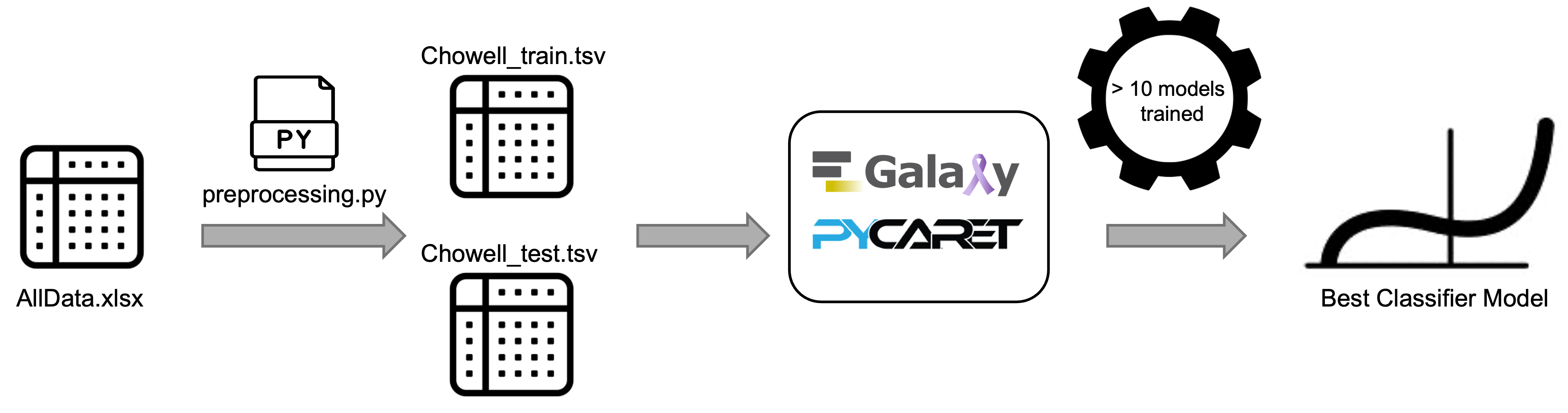{: style="width: 70%; display: block; margin-left: auto; margin-right: auto;"} --- # Dataset and predictors **Predictors (LLR6):** - TMB (truncated at 50) - Systemic Therapy History (0/1) - Albumin - Cancer Type (one-hot encoded) - NLR (truncated at 25) - Age (truncated at 85) **Target:** - Response (0 = no benefit, 1 = benefit) --- # Model selection idea Tabular Learner can: 1. Compare multiple candidate classifiers and pick the best under its evaluation protocol. 2. Restrict candidates to a specific family (e.g., logistic regression only). In this tutorial, we **train all candidate models** and check whether logistic regression remains among the best performers. --- # Data upload Import the preprocessed TSV files from Zenodo: - `Chowell_train_Response.tsv` - `Chowell_test_Response.tsv` Ensure the datatype is **tabular**, and optionally tag datasets for traceability. ??? The tutorial focuses on the preprocessed tables; a separate notebook/script performs the truncation and encoding steps. --- # Run 1: Train and select a best model Tabular Learner parameters: - Input Dataset: `Chowell_train_Response.tsv` - Test Dataset: `Chowell_test_Response.tsv` - Target column: `Response` - Task: `Classification` Run the tool to produce the **Best Model** and the **HTML report**. --- # Run 2: Re-evaluate at a selected threshold Rerun Tabular Learner with: - Customize Default Settings?: **Yes** - Classification Probability Threshold: **0.25** ??? Threshold-dependent metrics (accuracy, precision, recall, F1, MCC) change with the cutoff. This second run makes threshold choice explicit for comparisons. --- # Outputs to inspect - **Tabular Learner Best Model** (`.h5`): trained model + preprocessing. - **Tabular Learner Model Report** (HTML): setup, validation, test metrics, plots. - (Optional) **best_model.csv** (hidden): selected hyperparameters. --- # Report structure The report has four tabs: - **Model Config Summary**: data split + run settings + chosen threshold + best model hyperparameters. - **Validation Summary**: cross-validation table and diagnostic plots (e.g., calibration, threshold plot). - **Test Summary**: holdout/test metrics and ROC/PR/confusion matrix plots. - **Feature Importance**: coefficients/importance + SHAP/permutation/PDPs where available. 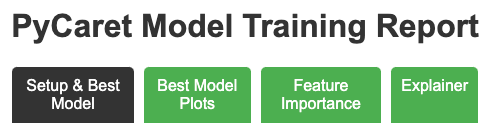{: style="width: 85%; display: block; margin-left: auto; margin-right: auto;"} --- # Benchmarking approach Separate metrics into: - **Threshold-independent** - ROC-AUC, PR-AUC (compare discrimination without choosing a cutoff) - **Threshold-dependent** - Accuracy, F1 (report together with the selected cutoff) Use the report to check: - split strategy and evaluation protocol - calibration and probability diagnostics - threshold plot (precision/recall/F1 vs cutoff) --- # Key numbers | Model | Threshold | Accuracy | ROC-AUC | PR-AUC | F1 | | --- | --- | --- | --- | --- | --- | | LLR6 (reference) | 0.30 | 0.68 | 0.72 | 0.53 | 0.53 | | Tabular Learner Run 1 | 0.50 | 0.80 | 0.76 | 0.55 | 0.42 | | Tabular Learner Run 2 | 0.25 | 0.67 | 0.76 | 0.55 | 0.52 | --- # Interpreting the differences - Both Tabular Learner runs show higher **ROC-AUC/PR-AUC** than LLR6, suggesting similar-or-better discrimination. - Changing the **threshold** shifts the operating point: - Run 1 (0.50): higher accuracy, lower F1 - Run 2 (0.25): lower accuracy, higher F1 - Check **calibration** to see whether probability scores are over/under-confident. 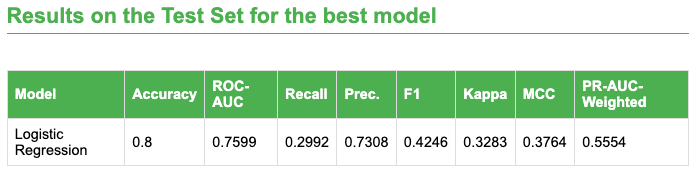{: style="width: 80%; display: block; margin-left: auto; margin-right: auto;"} --- # Conclusion - Tabular Learner enables a reproducible workflow to: - train, compare, and select models on tabular clinical data - evaluate discrimination, calibration, and threshold effects via a single report - Threshold choice must be justified because it can change clinical tradeoffs (false positives vs false negatives). --- # Galaxy Training Resources - Galaxy Training Materials: training.galaxyproject.org - Help Forum: help.galaxyproject.org - Events: galaxyproject.org/events 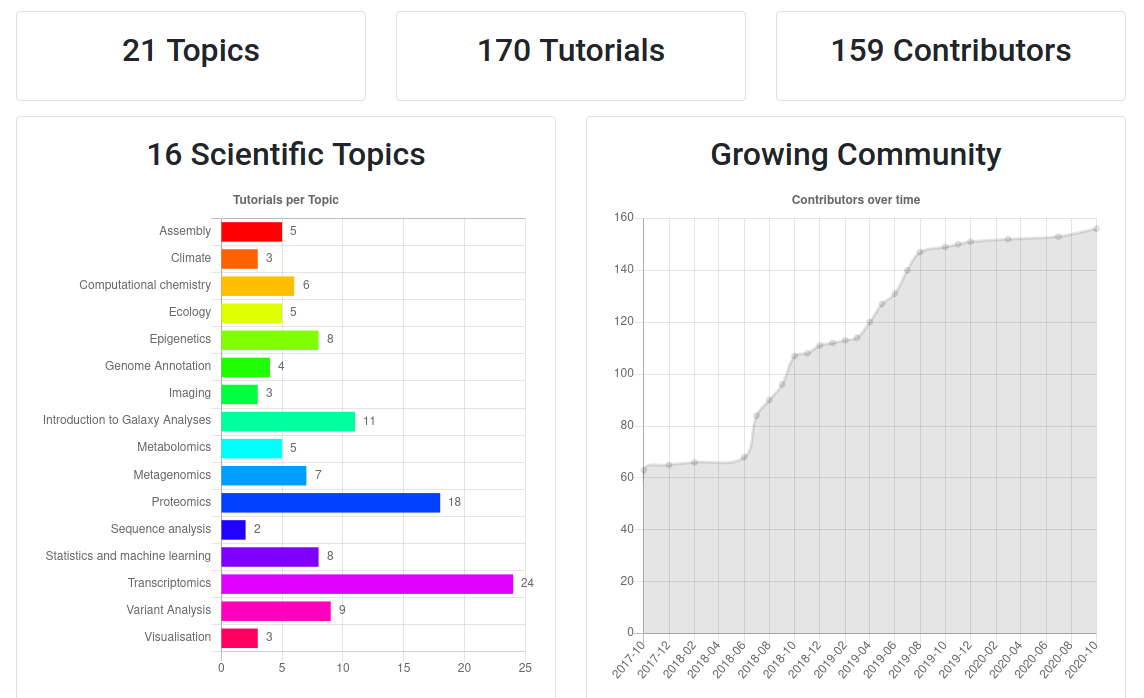 --- ## Thank You! This material is the result of a collaborative work. Thanks to the [Galaxy Training Network](https://training.galaxyproject.org) and all the contributors! <div markdown="0"> <div class="contributors-line"> <table class="contributions"> <tr> <td><abbr title="These people wrote the bulk of the tutorial, they may have done the analysis, built the workflow, and wrote the text themselves.">Author(s)</abbr></td> <td> <a href="/training-material/hall-of-fame/paulocilasjr/" class="contributor-badge contributor-paulocilasjr"><img src="/training-material/assets/images/orcid.png" alt="orcid logo" width="36" height="36"/><img src="https://avatars.githubusercontent.com/paulocilasjr?s=36" alt="Paulo Cilas Morais Lyra Junior avatar" width="36" class="avatar" /> Paulo Cilas Morais Lyra Junior</a><a href="/training-material/hall-of-fame/qchiujunhao/" class="contributor-badge contributor-qchiujunhao"><img src="/training-material/assets/images/orcid.png" alt="orcid logo" width="36" height="36"/><img src="https://avatars.githubusercontent.com/qchiujunhao?s=36" alt="Junhao Qiu avatar" width="36" class="avatar" /> Junhao Qiu</a><a href="/training-material/hall-of-fame/jgoecks/" class="contributor-badge contributor-jgoecks"><img src="/training-material/assets/images/orcid.png" alt="orcid logo" width="36" height="36"/><img src="https://avatars.githubusercontent.com/jgoecks?s=36" alt="Jeremy Goecks avatar" width="36" class="avatar" /> Jeremy Goecks</a> </td> </tr> <tr class="reviewers"> <td><abbr title="These people reviewed this material for accuracy and correctness">Reviewers</abbr></td> <td> <a href="/training-material/hall-of-fame/qchiujunhao/" class="contributor-badge contributor-badge-small contributor-qchiujunhao"><img src="https://avatars.githubusercontent.com/qchiujunhao?s=36" alt="Junhao Qiu avatar" width="36" class="avatar" /></a><a href="/training-material/hall-of-fame/paulocilasjr/" class="contributor-badge contributor-badge-small contributor-paulocilasjr"><img src="https://avatars.githubusercontent.com/paulocilasjr?s=36" alt="Paulo Cilas Morais Lyra Junior avatar" width="36" class="avatar" /></a><a href="/training-material/hall-of-fame/cumbof/" class="contributor-badge contributor-badge-small contributor-cumbof"><img src="https://avatars.githubusercontent.com/cumbof?s=36" alt="Fabio Cumbo avatar" width="36" class="avatar" /></a></td> </tr> </table> </div> </div> <div style="display: flex;flex-direction: row;align-items: center;justify-content: center;"> <img src="/training-material/assets/images/GTNLogo1000.png" alt="Galaxy Training Network" style="height: 100px;"/> </div> Tutorial Content is licensed under <a rel="license" href="http://creativecommons.org/licenses/by/4.0/">Creative Commons Attribution 4.0 International License</a>.<br/>