name: inverse layout: true class: center, middle, inverse <div class="my-header"><span> <a href="/training-material/topics/dev" title="Return to topic page" ><i class="fa fa-level-up" aria-hidden="true"></i></a> <a href="https://github.com/galaxyproject/training-material/edit/main/topics/dev/tutorials/architecture-markdown/slides.html"><i class="fa fa-pencil" aria-hidden="true"></i></a> </span></div> <div class="my-footer"><span> <img src="/training-material/assets/images/GTN-60px.png" alt="Galaxy Training Network" style="height: 40px;"/> </span></div> --- <img src="/training-material/assets/images/GTNLogo1000.png" alt="Galaxy Training Network" class="cover-logo"/> <br/> <br/> # Architecture 11 - Galaxy Markdown Architecture <br/> <br/> <div markdown="0"> <div class="contributors-line"> <a href="/training-material/hall-of-fame/jmchilton/" class="contributor-badge contributor-jmchilton"><img src="/training-material/assets/images/orcid.png" alt="orcid logo" width="36" height="36"/><img src="https://avatars.githubusercontent.com/jmchilton?s=36" alt="John Chilton avatar" width="36" class="avatar" /> John Chilton</a> </div> </div> <!-- modified date --> <div class="footnote" style="bottom: 8em;"> <i class="far fa-calendar" aria-hidden="true"></i><span class="visually-hidden">last_modification</span> Updated: <i class="fas fa-fingerprint" aria-hidden="true"></i><span class="visually-hidden">purl</span><abbr title="Persistent URL">PURL</abbr>: <a href="https://gxy.io/GTN:S00149">gxy.io/GTN:S00149</a> </div> <!-- other slide formats (video and plain-text) --> <div class="footnote" style="bottom: 5em;"> <i class="fas fa-file-alt" aria-hidden="true"></i><span class="visually-hidden">text-document</span><a href="slides-plain.html"> Plain-text slides</a> | </div> <!-- usage tips --> <div class="footnote" style="bottom: 2em;"> <strong>Tip: </strong>press <kbd>P</kbd> to view the presenter notes | <i class="fa fa-arrows" aria-hidden="true"></i><span class="visually-hidden">arrow-keys</span> Use arrow keys to move between slides </div> ??? Presenter notes contain extra information which might be useful if you intend to use these slides for teaching. Press `P` again to switch presenter notes off Press `C` to create a new window where the same presentation will be displayed. This window is linked to the main window. Changing slides on one will cause the slide to change on the other. Useful when presenting. --- ### <i class="far fa-question-circle" aria-hidden="true"></i><span class="visually-hidden">question</span> Questions - What is Galaxy Markdown and how does it differ from regular HTML? - How do contextual references get resolved to internal IDs? - What is the transformation pipeline for Galaxy Markdown? - How do frontend components render Galaxy directives? --- ### <i class="fas fa-bullseye" aria-hidden="true"></i><span class="visually-hidden">objectives</span> Objectives - Understand the contextual addressing system for Galaxy Markdown - Learn the backend parsing and transformation pipeline - Understand the handler pattern for export/rendering - Know how frontend components process Galaxy directives - Learn the editor architecture for pages and reports --- layout: introduction_slides topic_name: Galaxy Architecture # Architecture 11 - Galaxy Markdown Architecture *Portable, reproducible documentation with embedded Galaxy objects..* --- layout: true name: left-aligned class: left, middle --- layout: true class: center, middle --- class: enlarge150 ### What is Galaxy Markdown? - Portable, reproducible documentation with embedded Galaxy objects - Alternative to HTML (instance-locked) - Powers: workflow reports, pages, tool outputs --- class: center 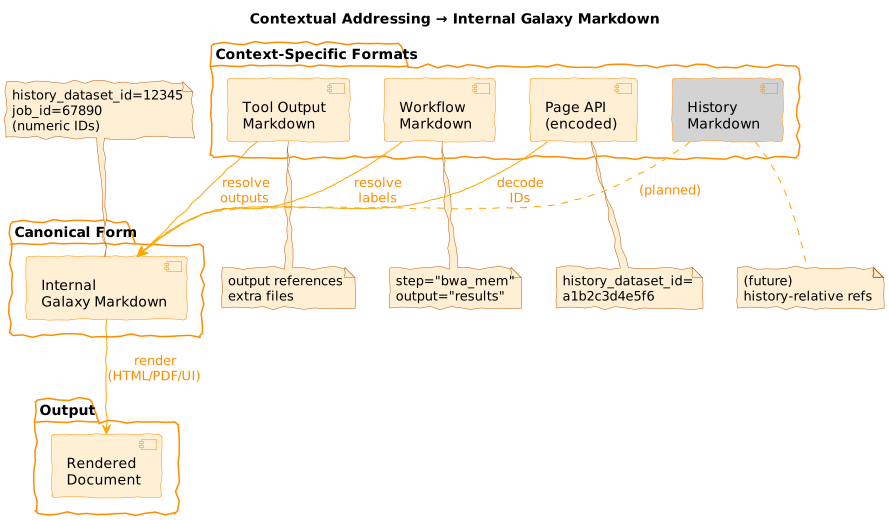 --- class: enlarge150 ### Three Document Types | Type | Editable | Scope | Use Case | |------|----------|-------|----------| | Reports | No | Invocation | Workflow output docs | | Pages | Yes | Any | User documentation | | Tool Output | No | Job | Tool-generated reports | --- class: center  `lib/galaxy/managers/markdown_parse.py` --- class: reduce90 ### Directive Syntax **Block directive:** ```` ```galaxy history_dataset_as_table(history_dataset_id=12345, title="Results") ``` ```` **Inline directive:** ``` Text with ${galaxy history_dataset_name(output="results")} embedded. ``` `lib/galaxy/managers/markdown_parse.py:GALAXY_MARKDOWN_FUNCTION_CALL_LINE` --- class: enlarge120 ### 27 Directives - **Dataset:** `display`, `as_image`, `as_table`, `peek`, `info`, `link`, `name`, `type` - **Workflow:** `display`, `image`, `license`, `invocation_inputs/outputs` - **Job:** `parameters`, `metrics`, `tool_stdout/stderr` - **Meta:** `generate_time`, `generate_galaxy_version`, `invocation_time` - **Instance:** 6 `instance_*_link` variants --- class: reduce90 ### Validation ```python def validate_galaxy_markdown(galaxy_markdown, internal=True): # Line-by-line fence tracking state machine for line, fenced, open_fence, line_no in _split_markdown_lines(markdown): if fenced and GALAXY_FUNC_CALL.match(line): _check_func_call(match, line_no) # Validates args # Raises ValueError with line number on failure ``` `lib/galaxy/managers/markdown_parse.py:validate_galaxy_markdown()` --- class: center  --- class: center  `lib/galaxy/managers/markdown_util.py` --- class: reduce90 ### ID Encoding ```python # Storage (internal): numeric IDs history_dataset_display(history_dataset_id=12345) # Export (external): encoded IDs for URLs history_dataset_display(history_dataset_id=a1b2c3d4e5f6) # Regex patterns for conversion UNENCODED_ID_PATTERN = r"(history_dataset_id)=([\\d]+)" ENCODED_ID_PATTERN = r"(history_dataset_id)=([a-z0-9]+)" ``` --- class: reduce90 ### Invocation Resolution ```python # Input: workflow-relative references invocation_outputs(output="alignment_results") job_metrics(step="bwa_mem") # Output: instance-specific IDs history_dataset_display(history_dataset_id=98765) job_metrics(job_id=54321) ``` `lib/galaxy/managers/markdown_util.py:resolve_invocation_markdown()` --- class: center 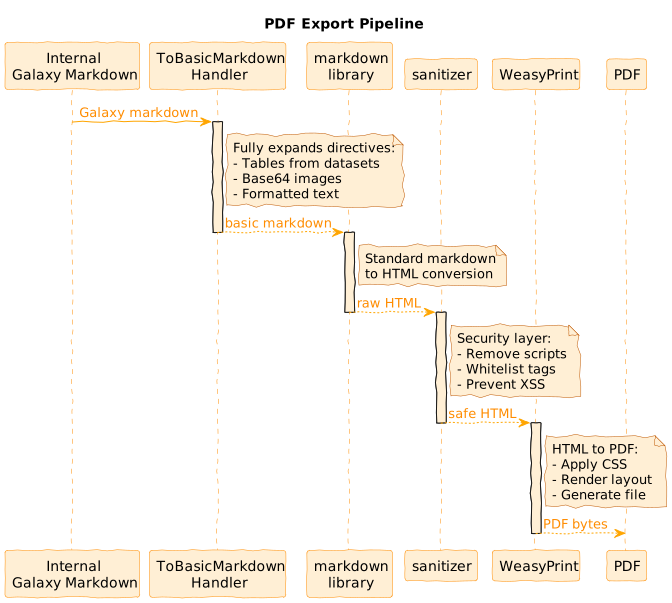 `lib/galaxy/managers/markdown_util.py:internal_galaxy_markdown_to_pdf()` --- class: center 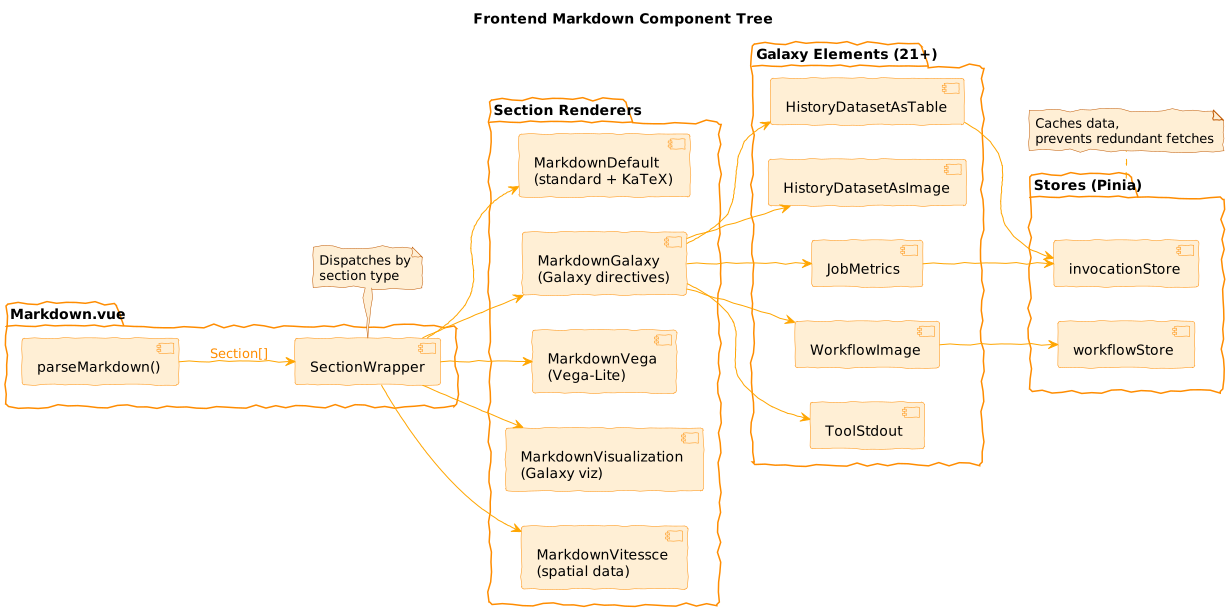 `client/src/components/Markdown/Markdown.vue` --- class: reduce90 ### Section Parsing ```typescript // Triple-backtick splits content into typed sections parseMarkdown(content) → [ { type: 'markdown', content: '# Title...' }, { type: 'galaxy', content: 'history_dataset_as_table(...)' }, { type: 'vega', content: '{"$schema": "..."}' } ] ``` `client/src/components/Markdown/parse.ts` --- class: center 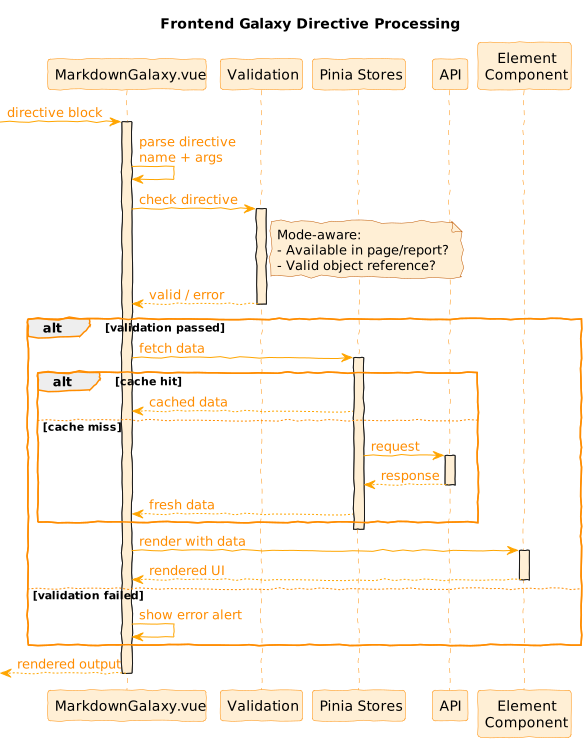 `client/src/components/Markdown/Sections/MarkdownGalaxy.vue` --- class: enlarge120 ### Element Components **21+ specialized renderers:** - `HistoryDatasetAsTable`, `HistoryDatasetAsImage` - `WorkflowImage`, `WorkflowDisplay` - `JobMetrics`, `JobParameters` - `ToolStdout`, `ToolStderr` Each handles data fetching + rendering. `client/src/components/Markdown/Sections/Elements/` --- class: center 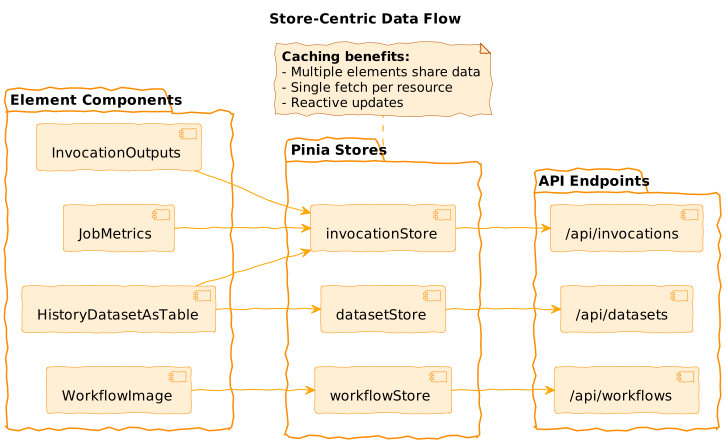 --- class: center 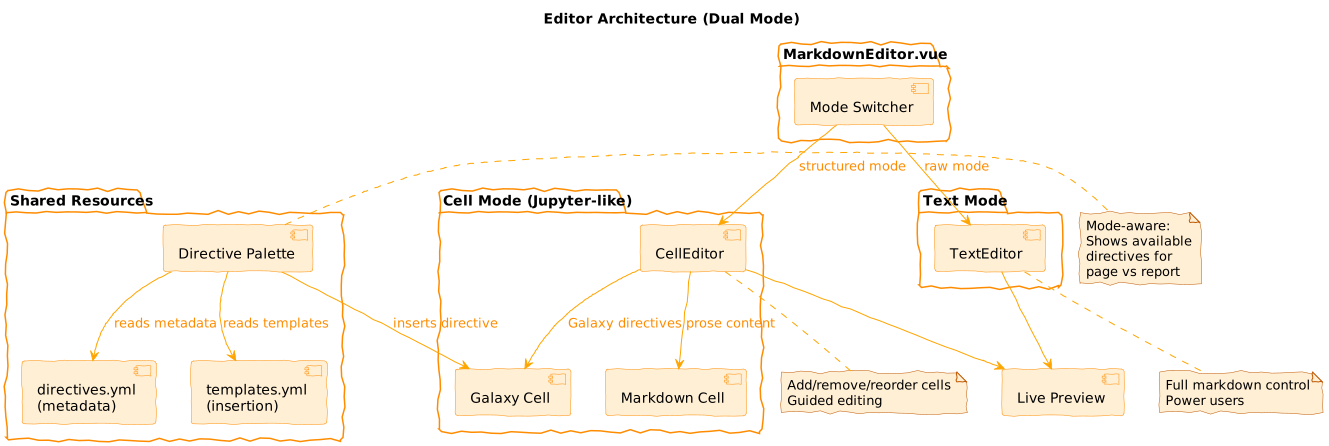 `client/src/components/Markdown/MarkdownEditor.vue` --- class: reduce90 ### Directive Registry ```yaml # directives.yml - metadata for editor UI history_dataset_as_table: side_panel_name: page: "Dataset Table" report: "Output Table" help: "Embed dataset as formatted table..." # templates.yml - insertion templates history_dataset_as_table: template: 'history_dataset_as_table(history_dataset_id="%ID%")' ``` `client/src/components/Markdown/directives.yml` --- class: enlarge150 ### Mode-Aware Design - **Page mode:** Reference any workflow/dataset in instance - **Report mode:** Reference "this" invocation (step labels) - Same directives, different presentation and validation --- class: center 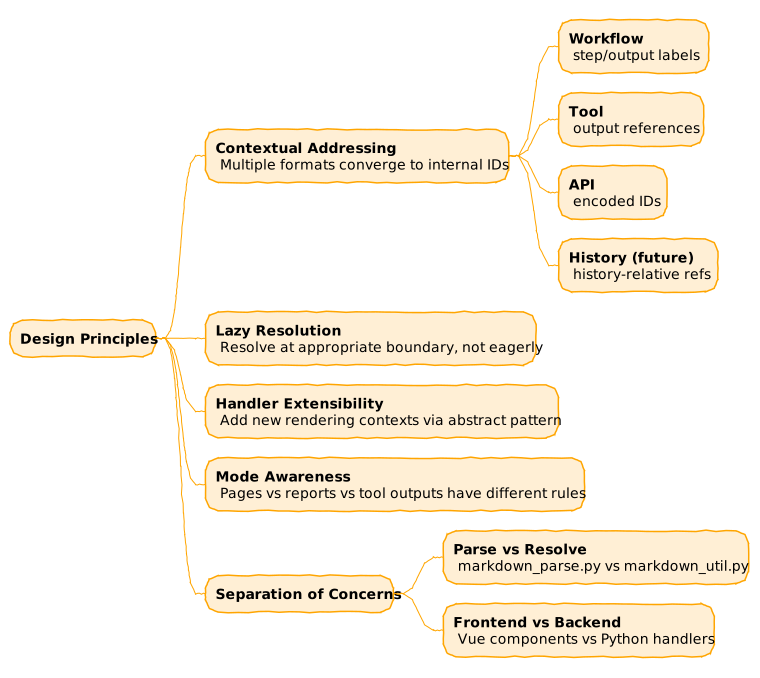 --- class: reduce90 ### Adding a Directive ```python # 1. markdown_parse.py - add to ALLOWED_ARGUMENTS ALLOWED_ARGUMENTS["new_directive"] = frozenset(["arg1", "arg2"]) # 2. markdown_util.py - add handler method def handle_new_directive(self, ...): ... # 3. Frontend - add element component # client/src/components/Markdown/Sections/Elements/NewDirective.vue # 4. directives.yml - add metadata ``` --- class: center 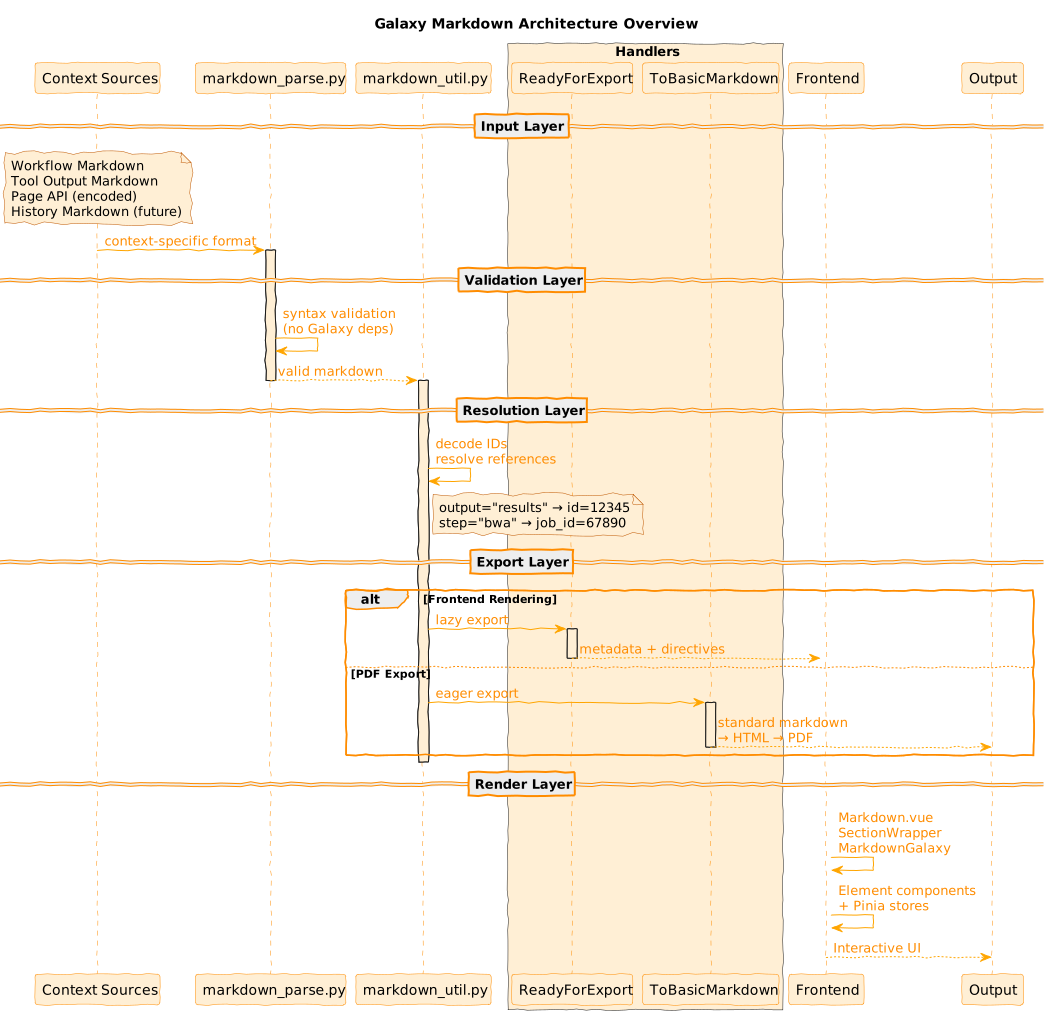 --- class: enlarge200 ### Key Takeaways - **Portable:** Context-specific refs → internal IDs at boundaries - **Extensible:** Handler pattern, directive registry, new contexts - **Multi-format:** Same internal form → HTML, PDF, interactive UI - **27+ directives** for embedding Galaxy objects .footnote[Previous: [Galaxy File Sources Architecture](/training-material/topics/dev/tutorials/architecture-file-sources/slides.html) | Next: [Galaxy Client Architecture](/training-material/topics/dev/tutorials/architecture-client/slides.html)] --- ### <i class="fas fa-key" aria-hidden="true"></i><span class="visually-hidden">keypoints</span> Key points - Galaxy Markdown enables portable documentation via contextual addressing - Multiple context-specific formats converge to internal IDs at boundaries - Handler pattern enables lazy (frontend) vs eager (PDF) export - 27+ directives for embedding Galaxy objects - Frontend uses store-centric data flow for caching --- ## Thank You! This material is the result of a collaborative work. Thanks to the [Galaxy Training Network](https://training.galaxyproject.org) and all the contributors! <div markdown="0"> <div class="contributors-line"> <a href="/training-material/hall-of-fame/jmchilton/" class="contributor-badge contributor-jmchilton"><img src="/training-material/assets/images/orcid.png" alt="orcid logo" width="36" height="36"/><img src="https://avatars.githubusercontent.com/jmchilton?s=36" alt="John Chilton avatar" width="36" class="avatar" /> John Chilton</a> </div> </div> <div style="display: flex;flex-direction: row;align-items: center;justify-content: center;"> <img src="/training-material/assets/images/GTNLogo1000.png" alt="Galaxy Training Network" style="height: 100px;"/> </div> Tutorial Content is licensed under <a rel="license" href="http://creativecommons.org/licenses/by/4.0/">Creative Commons Attribution 4.0 International License</a>.<br/>