name: inverse layout: true class: center, middle, inverse <div class="my-header"><span> <a href="/training-material/topics/dev" title="Return to topic page" ><i class="fa fa-level-up" aria-hidden="true"></i></a> <a href="https://github.com/galaxyproject/training-material/edit/main/topics/dev/tutorials/architecture-application-components/slides.html"><i class="fa fa-pencil" aria-hidden="true"></i></a> </span></div> <div class="my-footer"><span> <img src="/training-material/assets/images/GTN-60px.png" alt="Galaxy Training Network" style="height: 40px;"/> </span></div> --- <img src="/training-material/assets/images/GTNLogo1000.png" alt="Galaxy Training Network" class="cover-logo"/> <br/> <br/> # Architecture 08 - Galaxy Application Components: Models, Managers, and Services <br/> <br/> <div markdown="0"> <div class="contributors-line"> <a href="/training-material/hall-of-fame/jmchilton/" class="contributor-badge contributor-jmchilton"><img src="/training-material/assets/images/orcid.png" alt="orcid logo" width="36" height="36"/><img src="https://avatars.githubusercontent.com/jmchilton?s=36" alt="John Chilton avatar" width="36" class="avatar" /> John Chilton</a> </div> </div> <!-- modified date --> <div class="footnote" style="bottom: 8em;"> <i class="far fa-calendar" aria-hidden="true"></i><span class="visually-hidden">last_modification</span> Updated: <i class="fas fa-fingerprint" aria-hidden="true"></i><span class="visually-hidden">purl</span><abbr title="Persistent URL">PURL</abbr>: <a href="https://gxy.io/GTN:S00141">gxy.io/GTN:S00141</a> </div> <!-- other slide formats (video and plain-text) --> <div class="footnote" style="bottom: 5em;"> <i class="fas fa-file-alt" aria-hidden="true"></i><span class="visually-hidden">text-document</span><a href="slides-plain.html"> Plain-text slides</a> | </div> <!-- usage tips --> <div class="footnote" style="bottom: 2em;"> <strong>Tip: </strong>press <kbd>P</kbd> to view the presenter notes | <i class="fa fa-arrows" aria-hidden="true"></i><span class="visually-hidden">arrow-keys</span> Use arrow keys to move between slides </div> ??? Presenter notes contain extra information which might be useful if you intend to use these slides for teaching. Press `P` again to switch presenter notes off Press `C` to create a new window where the same presentation will be displayed. This window is linked to the main window. Changing slides on one will cause the slide to change on the other. Useful when presenting. --- ### <i class="far fa-question-circle" aria-hidden="true"></i><span class="visually-hidden">question</span> Questions - How is business logic organized in Galaxy? - What are models, managers, and services? - How does the database layer work? --- ### <i class="fas fa-bullseye" aria-hidden="true"></i><span class="visually-hidden">objectives</span> Objectives - Understand the three-layer architecture - Learn about SQLAlchemy and the ORM - Understand database migrations with Alembic - Navigate the Galaxy data model --- layout: introduction_slides topic_name: Galaxy Architecture # Architecture 08 - Galaxy Application Components: Models, Managers, and Services *The architecture surrounding Galaxy components.* --- layout: true name: left-aligned class: left, middle --- layout: true class: center, middle --- class: center 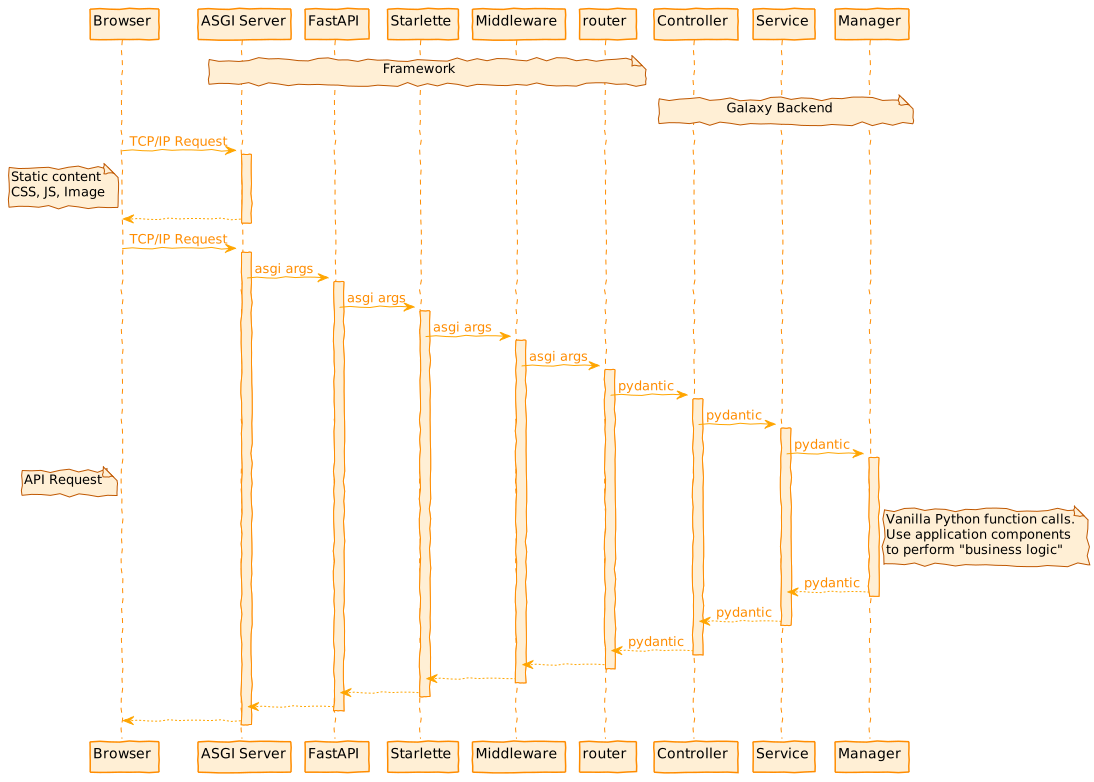 --- There are many ways to describe and visualize the Galaxy server architecture, one is to imagine the Galaxy database as the ultimate source for Galaxy "stuff" and the API controllers as the ultimate sink. In this architecture imagining of Galaxy, managers are the layer meant to mediate all controller interactions (and isolate the backend from the web framework) while the model layer is meant to mediate all database interactions (and isolate the backend from database internals). --- class: center 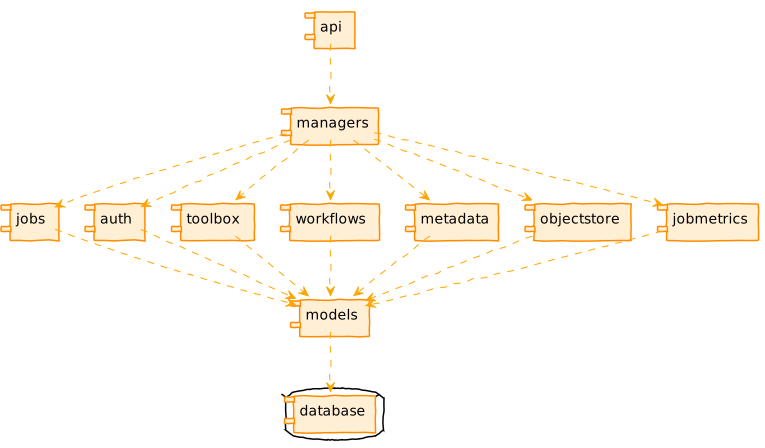 --- class: enlarge150 ### Services Handle API and web processing details of requests and responses at a high-level. Thin layer below the controllers to shield applciation logic from FastAPI internals. In practice, it is totally fine to skip this layer and have FastAPI controllers talk directly to managers. Also in practice, there are many places where the controller or service layers are thicker than they should be - and these are anti-patterns that shouldn't be followed. --- class: enlarge150 ### Managers High-level business logic that ties all of these components together. Controllers should ideally be thin wrappers around actions defined in managers. Whenever a model requires more than just the database, the operation should be defined in a manager instead of in the model. --- class: center ### Managers - Some Key Files 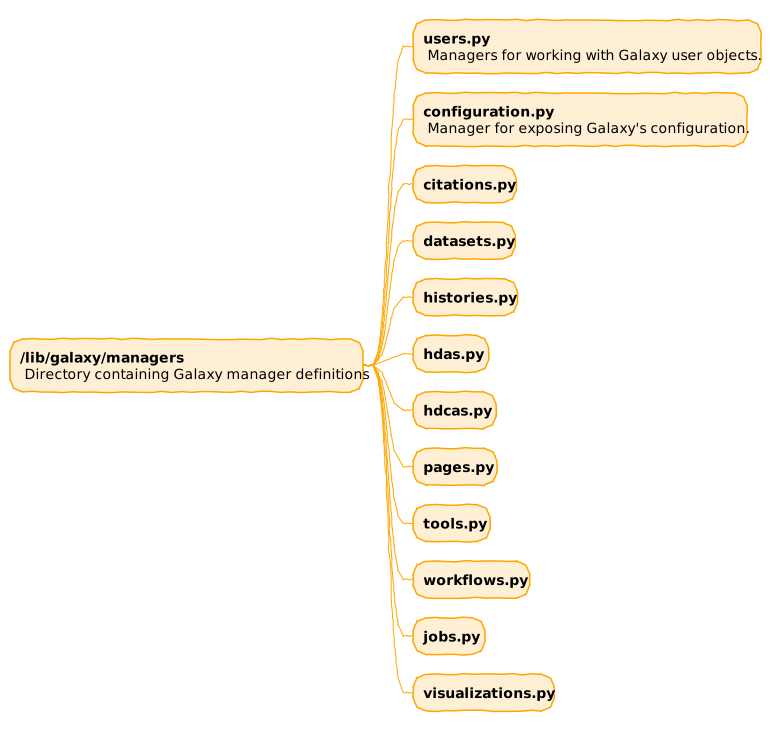 --- class: center ### Managers - Some Helpers 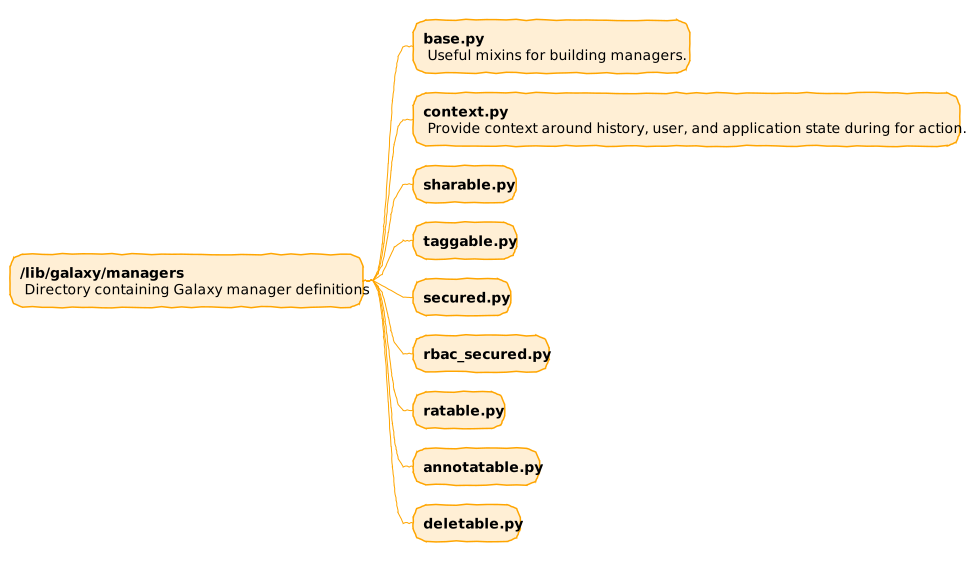 --- ### Galaxy Models - Database interactions powered by SQLAlchemy - https://www.sqlalchemy.org/. - Galaxy doesn't think in terms of "rows" but "objects". - Classes for Galaxy model objects defined in `lib/galaxy/model/__init__.py`. - Classes mapped to database objects in same module via "declarative mapping". - Classes/attributes mapped to tables/columns - Associations between classes mapped to relationships between tables --- class: center  --- ### Galaxy Database Schema Migrations - Automated execution of incremental, reversible changes to the database schema. - Performed to update or revert the database schema to a newer or older version. - Powered by Alembic - https://alembic.sqlalchemy.org/. - (as of 22.05; prior to that by SQLAlchemy Migrate) - Each file in `lib/galaxy/model/migrations/alembic/versions_gxy` represents a migration description - `e7b6dcb09efd_create_gxy_branch.py` - `6a67bf27e6a6_deferred_data_tables.py` - `b182f655505f_add_workflow_source_metadata_column.py` --- ### More on Schema Migrations - Great documentation in code README - `lib/galaxy/model/migrations/README.md` - Admin perspective on how to migrate databases forward and revert on problems. - Developer persepctive on how to add new revisions. - Galaxy's data model is split into the galaxy model and the legacy install model: - Persisted in one combined database or two separate databases - Represented by 2 migration branches: "gxy" and "tsi" - Schema changes defined in revision modules: - `lib/galaxy/model/migrations/alembic/versions_gxy` (gxy branch: galaxy model) - `lib/galaxy/model/migrations/alembic/versions_tsi` (tsi branch: legacy install model) --- class: center ### Database Diagram  https://galaxyproject.org/admin/internals/data-model/ --- class: center  --- class: center  --- ### Dataset Metadata - Typed key-value pairs attached to HDA. - Keys and types defined at the datatype level. - Can be used by tools to dynamically control the tool form. ??? --- class: center  --- class: center  --- class: center  --- class: center  --- class: center 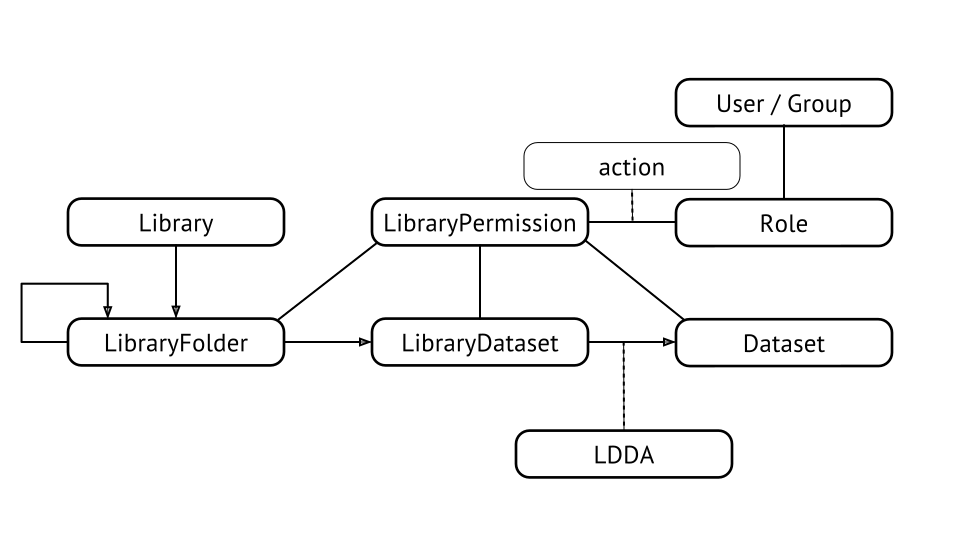 .footnote[Previous: [Galaxy Task Management with Celery](/training-material/topics/dev/tutorials/architecture-tasks/slides.html) | Next: [Galaxy Plugin Architecture](/training-material/topics/dev/tutorials/architecture-plugins/slides.html)] --- ### <i class="fas fa-key" aria-hidden="true"></i><span class="visually-hidden">keypoints</span> Key points - Services handle high-level API processing - Managers contain business logic - Models mediate database interactions - SQLAlchemy provides ORM - Alembic handles schema migrations --- ## Thank You! This material is the result of a collaborative work. Thanks to the [Galaxy Training Network](https://training.galaxyproject.org) and all the contributors! <div markdown="0"> <div class="contributors-line"> <a href="/training-material/hall-of-fame/jmchilton/" class="contributor-badge contributor-jmchilton"><img src="/training-material/assets/images/orcid.png" alt="orcid logo" width="36" height="36"/><img src="https://avatars.githubusercontent.com/jmchilton?s=36" alt="John Chilton avatar" width="36" class="avatar" /> John Chilton</a> </div> </div> <div style="display: flex;flex-direction: row;align-items: center;justify-content: center;"> <img src="/training-material/assets/images/GTNLogo1000.png" alt="Galaxy Training Network" style="height: 100px;"/> </div> Tutorial Content is licensed under <a rel="license" href="http://creativecommons.org/licenses/by/4.0/">Creative Commons Attribution 4.0 International License</a>.<br/>